How to purchase or redeem vouchers on the CelcomDigi App?
Modified on Mon, 9 Feb at 2:52 PM
Find out how to easily purchase or redeem vouchers using the CelcomDigi app.
Steps | Guide |
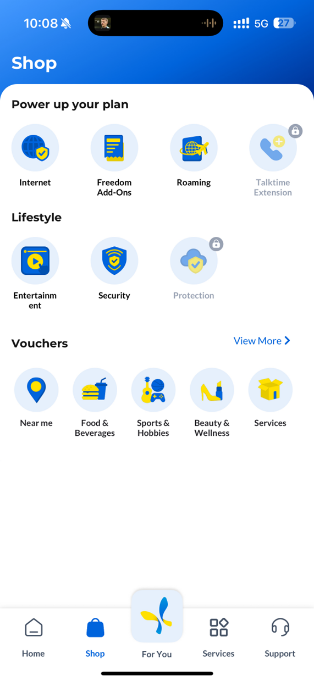
Step 1: Go to the ‘Shop’ tab and choose a voucher category to browse available vouchers |
|
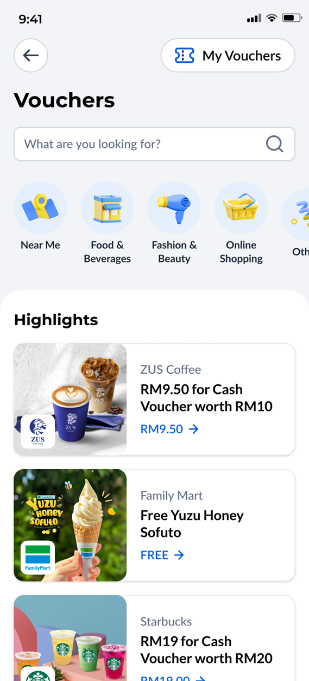
Step 2: Select a voucher and tap ‘Purchase’ to proceed |
|
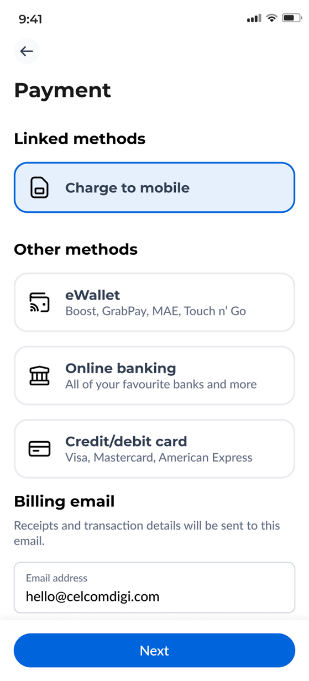
Step 3: Choose your preferred payment method, confirm your email address, and tap ‘Next’ to complete the payment |
|
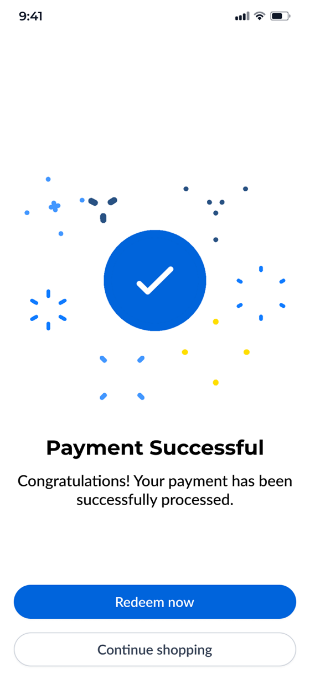
Step 4: After the payment is completed, you can tap ‘Redeem Now’ to use your voucher or ‘Continue Shopping’ to explore more deals. |
|
Was this article helpful?
That’s Great!
Thank you for your feedback
Sorry! We couldn't be helpful
Thank you for your feedback
Feedback sent
We appreciate your effort and will try to fix the article


