
- Mobile
- Devices
- At home
- Help
en
Inspire
Link 1
Link 2
At home
Choose your home Internet
Home FibreMulti-room WiFiPortable Home WiFiCheck coverageFind the right planFibre set up and supportFollow the steps below to set up your account for the first time, and to verify and secure your profile.
Step 1: Sign up using your mobile number.

You now have access to all key transactions and exclusive rewards:
Step 2: Enhance your profile with Single Sign-On identity verification (eKYC).
Identity verification is important to secure your personal data. Once you have completed this step, you will be able to:
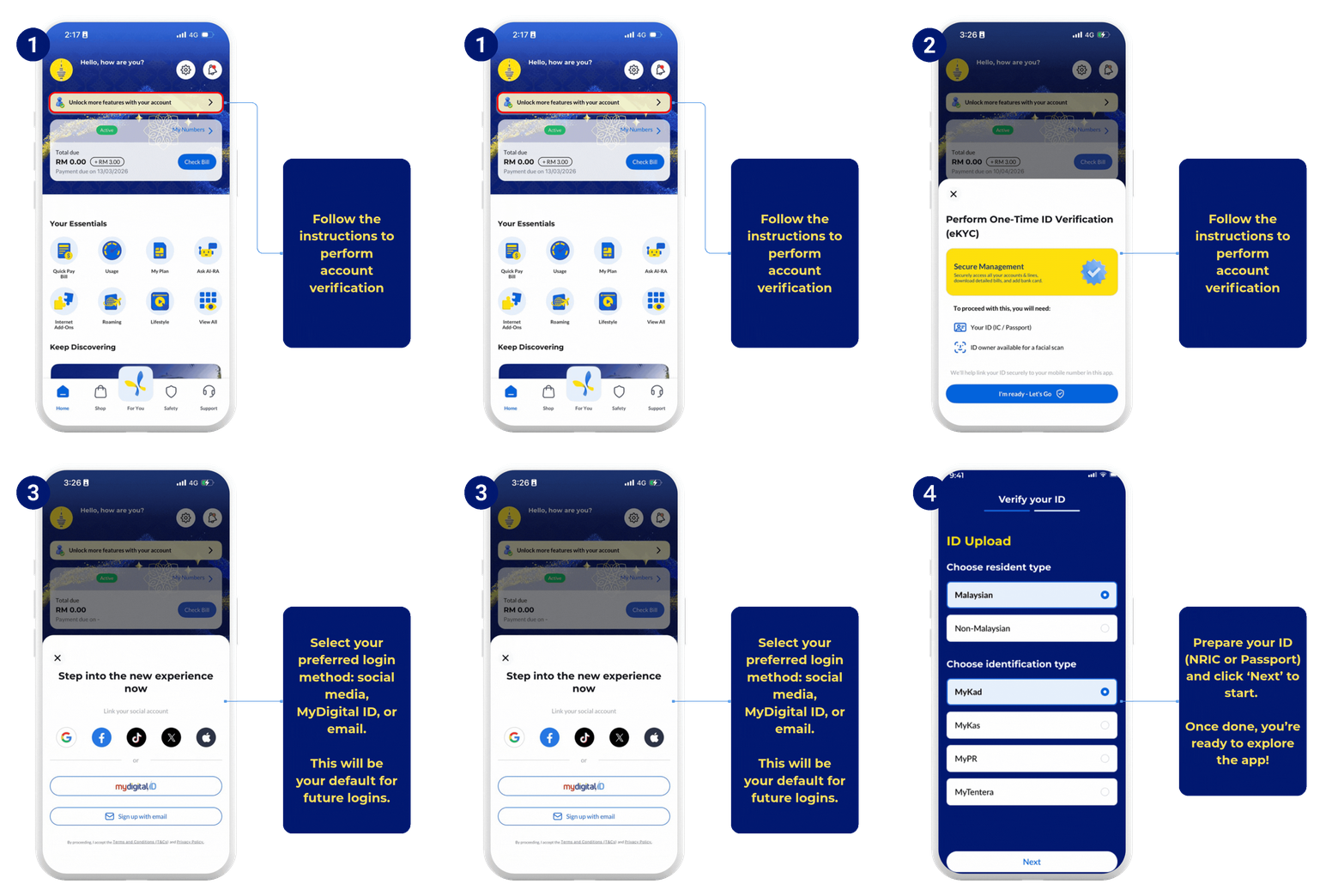
Completing your account verification ensures that only the verified account holder can access the profile, while enabling faster and more secure logins in the future. Learn more about why eKYC or account verification is important and how to complete it successfully.
Step 3: Remember your login method.
Once your identity is verified, please log in using the same method (social, MyDigital ID, or email).

If you are unable to access certain features, you may not be logged into your verified profile. Simply log out and sign in again using the verified login method to regain full access.





