
- Mobile
- Devices
- At home
- Help
en
Inspire
Link 1
Link 2
At home
Choose your home Internet
Home FibreMulti-room WiFiPortable Home WiFiCheck coverageFind the right planFibre set up and supportAdd-on purchases will be deducted from your credit balance. Please ensure you have sufficient credit or reload your account before making a purchase.
| Channels | Details |
|---|---|
| Auto Reload via CelcomDigi App |
Step 1: On the homepage, click ‘View All’ under the ‘Your Essentials’ section, then select ‘Auto Reload’ 

Step 2: Toggle the ‘Monthly Auto Reload’ option 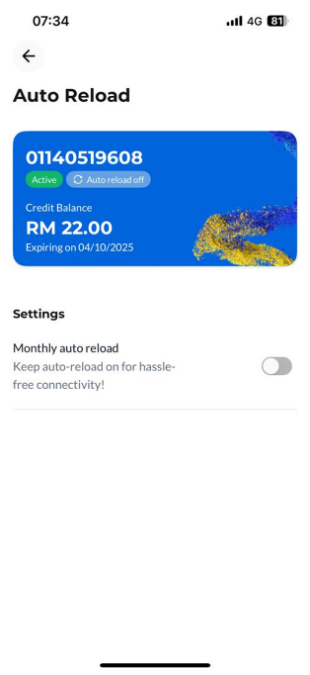
Step 3: Set your preferred monthly reload date and amount to complete the setup. 

|
| CelcomDigi App |
Reload for Yourself Step 1: On the homepage, select ‘Reload’ 
Step 2: Select your preferred reload amount and click ‘Next’ 
Step 3: Select your preferred payment method and click ‘Next’ to proceed with the payment. 
Reload for Others Step 1: On the homepage, click ‘View All’ under the ‘Your Essentials’ section, then select ‘Reload for Others’ 

Step 2: Select or enter the mobile number you wish to reload 
Step 3: Select your reload amount and click ‘Next’ 
Step 4: Select your preferred payment method and click ‘Next’ to proceed with the payment. 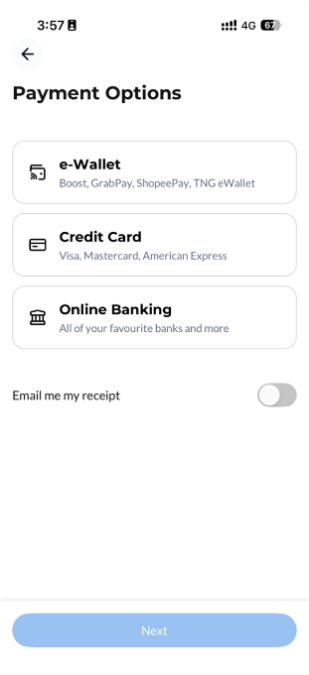
|
| CelcomDigi Website |
Step 1: Go to CelcomDigi website Step 2: Click 'Reload Prepaid' Step 3: Enter your mobile number Step 4: Select reload amount Step 5: Proceed with payment. |
| CelcomDigi Kiosks | Check the nearest CelcomDigi Kiosks and follow the steps on the screen to purchase reload. |
| e-Wallet or e-Commerce |
Reload can be purchased through these platforms:
|
| CelcomDigi Store | Walk into the nearest CelcomDigi Store to request to reload. |
| Online Banking | Major Malaysian banks like Maybank and CIMB typically offer this feature on their banking apps. Please check your preferred banking app to reload your prepaid account. |
| Reload via PIN |
You may reload with the PIN method from Celcom or Digi prepaid reload card, coupon or voucher. Each PIN contains 15-digit PIN numbers. 1. CelcomDigi App Step 1: On the homepage, select 'View All' Step 2: Tap on 'Pin Reload' Step 3: Tap on
Step 4: Click 'Next' 2. UMB (Celcom and Digi) Dial *122*<15-digit PIN number># Note: Digi Reload PIN method via UMB code *123# is still available until further notice. |





