CelcomDigi 5G Home WiFi
Modified on Thu, 8 Oct at 10:00 AM
Frequently Asked Questions
1. What are the available plans for the new CelcomDigi 5G Home WiFi?
CelcomDigi 5G Home WiFi comes with unlimited 5G/4G data, a free router and Viu Premium subscription, with the option to choose either the CelcomDigi 5G Home WiFi 99 (Essential) or CelcomDigi 5G Home WiFi 149 (Premium) plan.
Effective Date: 18 December 2025
5G Home WiFi Plan:
Plan | CelcomDigi 5G Home WiFi 99 (Essential) | CelcomDigi 5G Home WiFi 149 (Premium) | |
Monthly Commitment (RRP) | RM99 | RM149 | |
Monthly Rebate | - RM10 | - RM40 | |
Net Monthly Commitment | RM89 | RM109 | |
Device Price | Free | ||
Device Upfront | RM100 | RM200 | |
Router Type | Tozed ZLT C200 | Brovi H162 by Huawei | |
Monthly Internet Quota | Unlimited 5G/4G data | ||
Speed Cap | Up to 200Mbps * | Uncapped | |
Suitable For | Students and room renters | Families and house renters | |
Device Capacity | Connect up to 32 devices | Connect up to 128 devices | |
Contract | 24 months | ||
Ethernet Port(s) | 1 Gigabit Ethernet Port | 1 Gigabit + 1 2.5G Ethernet Port | |
Add-Ons | Free Viu Premium for 24 months | ||
* Limited time offers.
Note:
- A RM100 device deposit for Tozed ZLT C200 and RM200 device deposit for Brovi H162 by Huawei router may be applicable, subject to eligibility criteria. This deposit will be rebated to your monthly bill for over 10 months.
- For non-Malaysians, an additional deposit of RM500 is required upon registration.
- A one-time processing fee of RM10 will be charged for registration. An additional one-time SIM fee of RM5 will also apply for the provision of new SIM card. Both charges will be reflected in your first bill.
2. What's the difference between CelcomDigi 5G Home WiFi and using my CelcomDigi postpaid or prepaid data plan to hotspot at home?
CelcomDigi 5G Home WiFi provides a stable, high-speed connection with unlimited data, ideal for multiple devices at home. It uses a dedicated router, ensuring better performance for streaming, gaming, and work.
In contrast, a postpaid or prepaid hotspot relies on your mobile data, which may lead to slower speeds, interruptions, and battery drain. For a reliable home internet solution, CelcomDigi 5G Home WiFi is the better choice.
3. Who can sign up for this plan?
CelcomDigi 5G Home WiFi plans are open to both Malaysians and non-Malaysians aged 18 years and above.
4. How do I subscribe to CelcomDigi 5G Home WiFi plans?
You can subscribe to CelcomDigi 5G Home WiFi plans at the nearest CelcomDigi store.
5. What if my area has weak or intermittent 5G coverage?
No worries! If your 5G signal drops, the router will automatically switch to 4G, ensuring a seamless connection.
4G speeds (20Mbps to 100Mbps) are still fast enough for smooth HD/4K streaming, responsive online gaming (30-50ms latency), and reliable video calls or remote work. Even with weak 5G coverage, you’ll still have a stable and capable internet experience.
6. How do I check if my area has 5G?
You can check the 5G coverage map here.
7. Can I get these plans without a contract?
All CelcomDigi 5G Home WiFi plans come with a router and a 24-month contract.
8. Am I allowed to change my CelcomDigi 5G Home WiFi plan?
Yes, you are only allowed to upgrade your CelcomDigi 5G Home WiFi plan at any time even during the contract period. For each upgrade request, your existing contract will continue for a full period of 24 months. Downgrades are not allowed.
9. Can I make calls or send SMS with this plan?
No, this plan is for WiFi only. It does not support calls or SMS.
10. Can I use CelcomDigi Home WiFi outside Malaysia?
No, the service only works within Malaysia.
11. How do I set up the router?
No installation is needed as it is a plug and play router. Follow the steps below to start using your home internet:
Step 1: Find the spot in your home with the strongest 5G signal (near a window is best) and a plug point
Step 2: Plug in the router and turn it on
Step 3: The router’s LED light will indicate signal strength.
If you need more information, refer to this e-guide.
12. Is the unlimited 5G/4G internet truly unlimited?
Yes, you can use as much 5G/4G data as you want. However, the unlimited quota is subject to the CelcomDigi Fair Usage Policy. Please refer to our Terms & Conditions for more information.
13. Does the router come with a warranty period?
Yes, both the Tozed ZLT C200 and Brovi H162 by Huawei routers have a 24-month warranty starting from the purchase date.
14. My router is faulty, what should I do?
If you experience issues with your router within the warranty period, you can visit any of our CelcomDigi stores to get a replacement.
However, please note that the warranty does not cover physical damage, water damage, lightning strikes, or negligence. If your router is damaged due to these reasons, we can offer you a replacement at the regular retail price.
15. What devices can I connect to the router?
You can connect any WiFi capable device in your home to the router such as laptops, phones, smart TVs, gaming consoles, and even smart home gadgets.
16. What is the difference between the 2.4 GHz and 5 GHz WiFi?
The 2.4 GHz Wi-Fi has a longer range but is slower, while the 5 GHz Wi-Fi is faster but has a shorter range. If you need better coverage, connect to 2.4 GHz. If you want faster speeds and less interference, connect to 5 GHz.
17. Can I keep the router after my contract ends?
Yes, once your contract ends, the router is yours to keep but it may only be used with the CelcomDigi 5G Home WiFi plans.
18. How do I subscribe to my free 24-month VIU Premium subscription?
Your Viu Premium subscription is automatically activated upon successful sign up of the CelcomDigi 5G Home WiFi plan. For first time login, launch the Viu app or go to the Viu website and enter your CelcomDigi 5G Home WiFi number. You may refer to more details here.
19. What if I want to cancel my plan?
To cancel your CelcomDigi 5G Home WiFi plan, visit us in-store. Please note that if you cancel your plan before your 24-month contract is up, you’ll need to pay:
- Monthly Commitment value x the number of remaining months, or
- A minimum of RM500, whichever is higher
20. What is the difference between CelcomDigi 5G Home WiFi and CelcomDigi Fibre?
The main difference is how they connect to the internet:
- 5G Home WiFi uses a wireless 5G signal, so it’s easy to set up — just plug in the router and you’re online. However, since it relies on mobile networks, speeds and stability can vary depending on your area and signal strength.
- Fibre uses dedicated fibre optic cables, providing a more stable and consistent connection with faster speeds, lower latency, and no interruptions due to network congestion. If you’re streaming in 4K, gaming, or working from home, Fibre is the better choice for a seamless experience.
21. I have signed up for the CelcomDigi 5G Home WiFi 99 (Essential) plan but now I would like to upgrade to CelcomDigi 5G Home WiFi 149 (Premium) plan. Can I do this?
Yes, you are allowed to upgrade your plan to unlock the unlimited speed. However, you will not receive a new router while your current router is still within contract duration.
22. What is the AI feature on the Brovi H162 by Huawei router?
The router includes App Turbo (AI), a feature that helps optimize your network performance for gaming, streaming, or online meetings. You can simply select your desired scenario through the web portal.
Once a scenario is chosen, the router prioritizes and optimizes traffic for the relevant apps, helping to reduce latency and deliver a smoother, more responsive experience.
Please note that App Turbo (AI) does not improve weak network signal. If you are in an area with poor coverage, the signal strength will remain the same. However, the feature will still optimize your network performance based on the selected scenario to give you the best possible experience under the current conditions.
23. How do I select the App Turbo (AI) Scenario?
Step 1: Connect to the Home WiFi network
Step 2: Access Web portal 192.168.8.1.
Step 3: Enter the user admin account and device password (bottom of device label)
Step 4: On top of the bar, select 'Advanced > App Turbo'

Step 5: By default, App Turbo (AI) will be enabled for gaming scenario. You may select the scenario that you would like via the dropdown
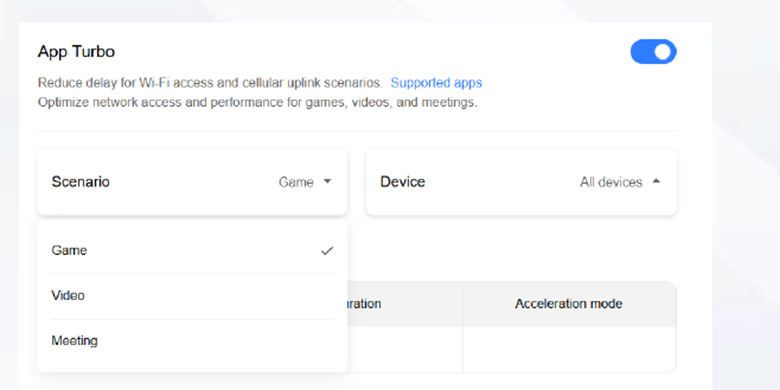
Step 6: If the app that you would like to optimize is already open before you have selected the scenario, you will need to restart the app for the optimization to take effect.
24. What are the apps supported by each of the App Turbo scenarios?
Application Name | Platform and App Version | Scenario |
1v1_LOL |
| Game |
Among Us |
| Game |
Apex Legends |
| Game |
Arena of Valor |
| Game |
BloodStrike |
| Game |
Brawl Stars |
| Game |
Brawlhalla |
| Game |
Call Of Duty Modern Warfare 2 |
| Game |
Call Of Duty Warzone |
| Game |
Call Of Duty: Mobile |
| Game |
CallOfDutyBlackOps6 |
| Game |
CallOfDutyModernWarfare3 |
| Game |
Clash Of Clans |
| Game |
Clash Royale |
| Game |
Counter-Strike: Global Offensive |
| Game |
Dead by Daylight |
| Game |
Destiny 2 |
| Game |
Diablo Immortal |
| Game |
Dota 2 |
| Game |
EAFC24 |
| Game |
EAFC25 |
| Game |
EaFIFA |
| Game |
FIFA Mobile Soccer |
| Game |
FIFA23 |
| Game |
Fortnite |
| Game |
Free Fire |
| Game |
Gang Beasts |
| Game |
Garena Realm of Valor |
| Game |
Garena Speed Drifters |
| Game |
Genshin Impact |
| Game |
Grand Theft Auto V |
| Game |
HaloInfinite |
| Game |
Hearth Stone |
| Game |
Honkai Impact 3 |
| Game |
Identity V |
| Game |
Identity V(China) |
| Game |
Knives Out |
| Game |
League Of Legends |
| Game |
League Of Legends(China) |
| Game |
MLBangBang |
| Game |
MagicTiles |
| Game |
Minecraft |
| Game |
NBA2K |
| Game |
NBA2K23 |
| Game |
NBA2K24 |
| Game |
NBA2K25 |
| Game |
Nvidia Geforce Now |
| Game |
OnePunchManWorld |
| Game |
Onmyoji Arena |
| Game |
OverWatch |
| Game |
PUBG Mobile |
| Game |
PUBG Mobile(China) |
| Game |
PUBG PC |
| Game |
Playhera |
| Game |
Princess Integrity |
| Game |
RagnarokOnline |
| Game |
Rainbow Six Siege |
| Game |
Redmatch2 |
| Game |
Rise Of Kingdoms |
| Game |
Roblox |
| Game |
Rocket League |
| Game |
Rust |
| Game |
Sea of Thieves |
| Game |
SquadBusters |
| Game |
StarCraft |
| Game |
Stardew Valley |
| Game |
Terraria |
| Game |
TheFinals |
| Game |
Three Kingdoms: Strategic Edition |
| Game |
Valorant |
| Game |
Wang Zhe Rong Yao |
| Game |
Warface |
| Game |
World Of Tanks |
| Game |
World Of Warcraft |
| Game |
World Of Warships |
| Game |
WutheringWaves |
| Game |
Bilibili |
| Streaming |
DouYin |
| Streaming |
KuaiShou |
| Streaming |
Kwai |
| Streaming |
MangoLive |
| Streaming |
| Streaming | |
TikTok |
| Streaming |
TwitchTV |
| Streaming |
DingDing |
| Meeting |
DingTalk |
| Meeting |
GoToMeeting |
| Meeting |
GoogleMeet |
| Meeting |
MicrosoftTeams |
| Meeting |
Slack |
| Meeting |
TencentMeeting |
| Meeting |
Viber |
| Meeting |
WebEx |
| Meeting |
Zoom |
| Meeting |
Was this article helpful?
That’s Great!
Thank you for your feedback
Sorry! We couldn't be helpful
Thank you for your feedback
Feedback sent
We appreciate your effort and will try to fix the article


