What are the CelcomDigi bill payment options available?
Modified on Thu, 30 Jul at 3:30 PM
Channels | Details |
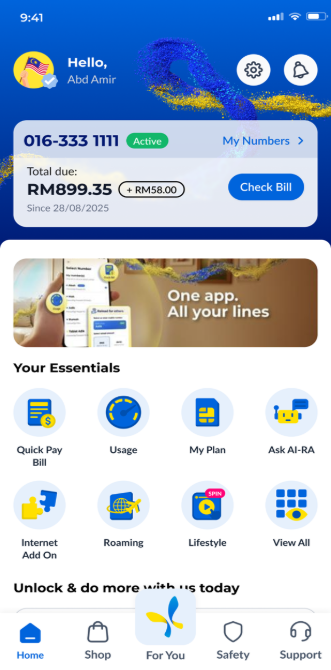
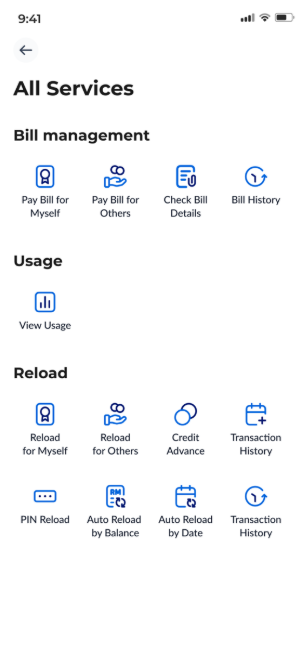
CelcomDigi App | Processing time: Within 30 minutes. On the homepage, click ‘Quick Pay Bill’ or ‘View All’ under the ‘Your Essentials’ section. Then, choose ‘Pay Bill for Myself’ to pay your own bill, or ‘Pay Bill for Others’ if you are making a payment on behalf of someone else.
Follow the in-app instructions to complete your payment. |
| CelcomDigi Website | Processing time: Within 30 minutes. Go to CelcomDigi website > Click 'Pay bill' > Enter your mobile number > Enter payment amount > Proceed with payment. |
| Auto-Billing | Processing time:
Click here to learn more about auto-billing. |
| e-Wallet/ e-Commerce | Processing time: Within 30 minutes. Participating Platforms:
|
JomPAY | Processing time: Within 30 minutes. Biller Codes:
Ref-1 is your CelcomDigi account number. |
| Online Banking | Processing time: Within 2 hours. |
| CelcomDigi Store | Processing time: Within 30 minutes. Click here to check the nearest CelcomDigi Store. |
CelcomDigi Kiosks | Processing time: Within 30 minutes. Click here to check the nearest CelcomDigi Kiosks. |
| Bill Payment Instalment/ BNPL (Buy Now, Pay Later) | Processing time: Within 30 minutes. Participating BNPL Platforms:
|
| Pos Malaysia | Processing time: Within 2 working days. |
Note: The processing times above indicate the expected timeframe for each payment channel. However, in some cases, it may take up to 24–48 hours for the payment to be reflected in your CelcomDigi account balance.
Note: Bulk payment is currently not available on the CelcomDigi app. If you would like to pay for more than one bill, please make the payments separately.Was this article helpful?
That’s Great!
Thank you for your feedback
Sorry! We couldn't be helpful
Thank you for your feedback
Feedback sent
We appreciate your effort and will try to fix the article


